
How to Apply for Apni Chat Apna Ghar 2026 – Step by Step Guide
Overview of Apni chat Apna ghar Apni Chat Apna Ghar scheme Punjab government ka ek ahem housing program hai jo low-income families ko interest-free loans dekar unka apna ghar banane ka sapna poori karta hai. Agar aap bhi is scheme ka fayda uthana chahte hain to sab se pehla aur ahem qadam hai apply online for Apni Chat Apna Ghar. Is…
Table of Content
Table of Contents
Overview of Apni chat Apna ghar
Apni Chat Apna Ghar scheme Punjab government ka ek ahem housing program hai jo low-income families ko interest-free loans dekar unka apna ghar banane ka sapna poori karta hai. Agar aap bhi is scheme ka fayda uthana chahte hain to sab se pehla aur ahem qadam hai apply online for Apni Chat Apna Ghar. Is article mein hum aapko step by step guide denge ke how to apply for Apni Chat Apna Ghar online, konse documents chahiye, eligibility kya hai, aur application ke baad status kaise check karna hai.
Punjab government ne is scheme ko transparent aur accessible banane ke liye ACAG Punjab online portal launch kiya hai. Ab aap ghar baithe Apni Chat Apna Ghar online apply kar sakte hain bina kisi agent ke chakkar mein pare. Toh chaliye seekhte hain ke how to apply for Apni Chat Apna Ghar scheme 2026.
Before You Apply – Important Requirements
How to apply for Apni Chat Apna Ghar se pehle yeh dekh lena zaroori hai ke aap eligible hain ya nahi. Neeche diye gaye requirements pooray karein:
✅ Punjab residency – Aapke CNIC par Punjab ka pata hona chahiye
✅ Land ownership – Urban mein 1-5 marla, Rural mein 1-10 marla plot aapke naam hona chahiye
✅ PMT score – 60 ya us se kam (NSER registry mein check hota hai)
✅ Family head – NADRA records mein aap head of family hon
✅ No loan default – Kisi bank ya financial institution ke defaulter na hon
Inke alawa required documents bhi pehle collect karlein taake apply online for Apni Chat Apna Ghar process smooth ho. Documents ki complete list hamare Required Documents page par hai.
Step by Step Process to Apply Online for Apni Chat Apna Ghar
Ab hum aapko step by step batayenge ke how to apply for Apni Chat Apna Ghar online:

Step 1 – Visit Official ACAG Punjab Portal
Sab se pehle official ACAG Punjab website par jayein:
Yeh government ka official portal hai yahan se hi Apni Chat Apna Ghar apply online karna hoga. Kisi aur website par apply na karein.
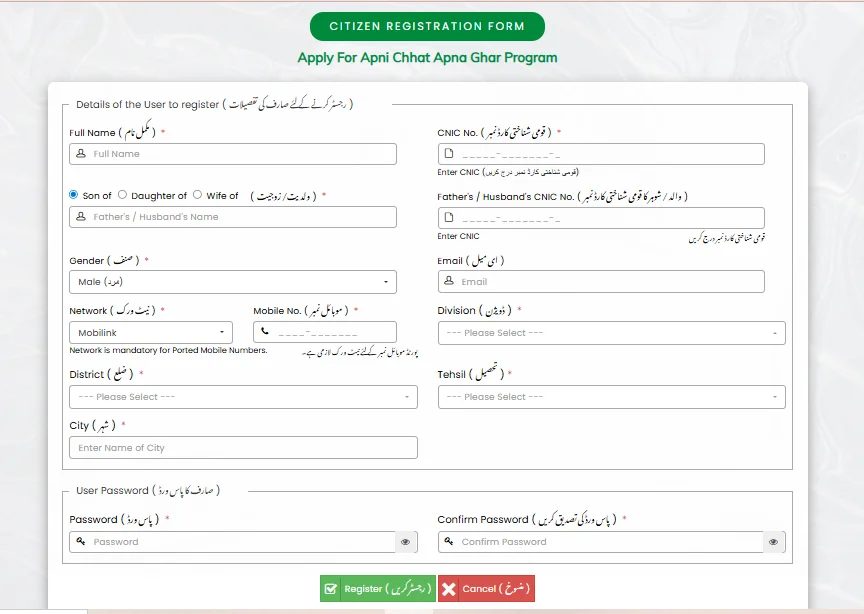
Step 2 – Complete Registration Form of Apni Chat Apna Ghar
Website par “Registration” button click karein. Ek form khulega jismein following details bharni hongi jis se ap is website per register ho jayen gy.
- Full Name: Apna poora naam likhein bilkul jaise aapke CNIC par likha hai.
- Son of / Daughter of / Wife of: Apne father ya husband ka naam likhein (relation ke hisaab se).
- Father’s / Husband’s Name: Upar diye gaye naam ko yahan bhi clear likhein.
- Gender: Male (مرد) ya Female (عورت) select karein.
- Mobile No.: Apna woh mobile number daalein jo active hai aur jis par SMS a sakay. Agar aapka number ported (jaise ek network se doosre mein shift) hai to “Network is mandatory for Ported Mobile Numbers” ka matlab hai ke aapko apna current network provider select karna hoga.
- District: Apni district select karein (jahan aap resident hain).
- City: Apne city ka naam likhein.
- CNIC No.: Apna CNIC number bina dash ke (jaise
3520212345678) daalein. Ye applicant ka hoga. - Father’s / Husband’s CNIC No.: Agar form mein maanga jaye to father ya husband ka CNIC number daalein. Ye optional bhi ho sakta hai.
- Email (if any): Agar aapke paas email hai to daalein, warna chor bhi sakte hain.
- Division: Apni division select karein (jaise Lahore Division, Faisalabad Division).
- Tehsil: Apni tehsil select karein.
- Password: Ek strong password banayein (kam az kam 8 characters, letters aur numbers ka mix). Is password se aap portal mein login karenge.
- Confirm Password: Jo password upar likha hai, wohi dobara likh kar confirm karein.
📌 Final Step Form Mein:
- Sab kuch check kar lene ke baad “Register” (رجسٹر کریں) button dabayein.
- Agar koi ghalti ho to “Cancel” (منسوخ کریں) press karke form dobara bharein.
Poori information sahi se bharein. Koi bhi mistake application reject hone ka sabab ban sakti hai. How to apply for Apni Chat Apna Ghar mein sab se important step yeh hai.
Step 3 – Login Page Apni Chat apna Ghar
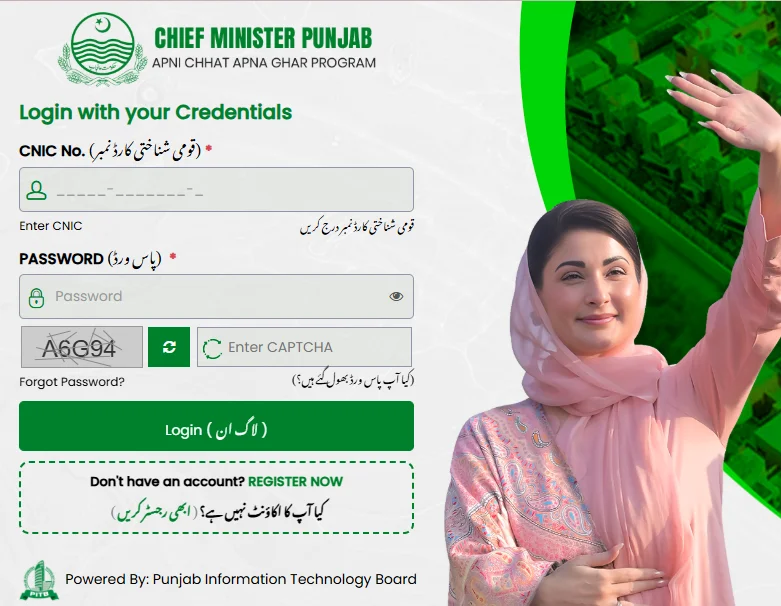
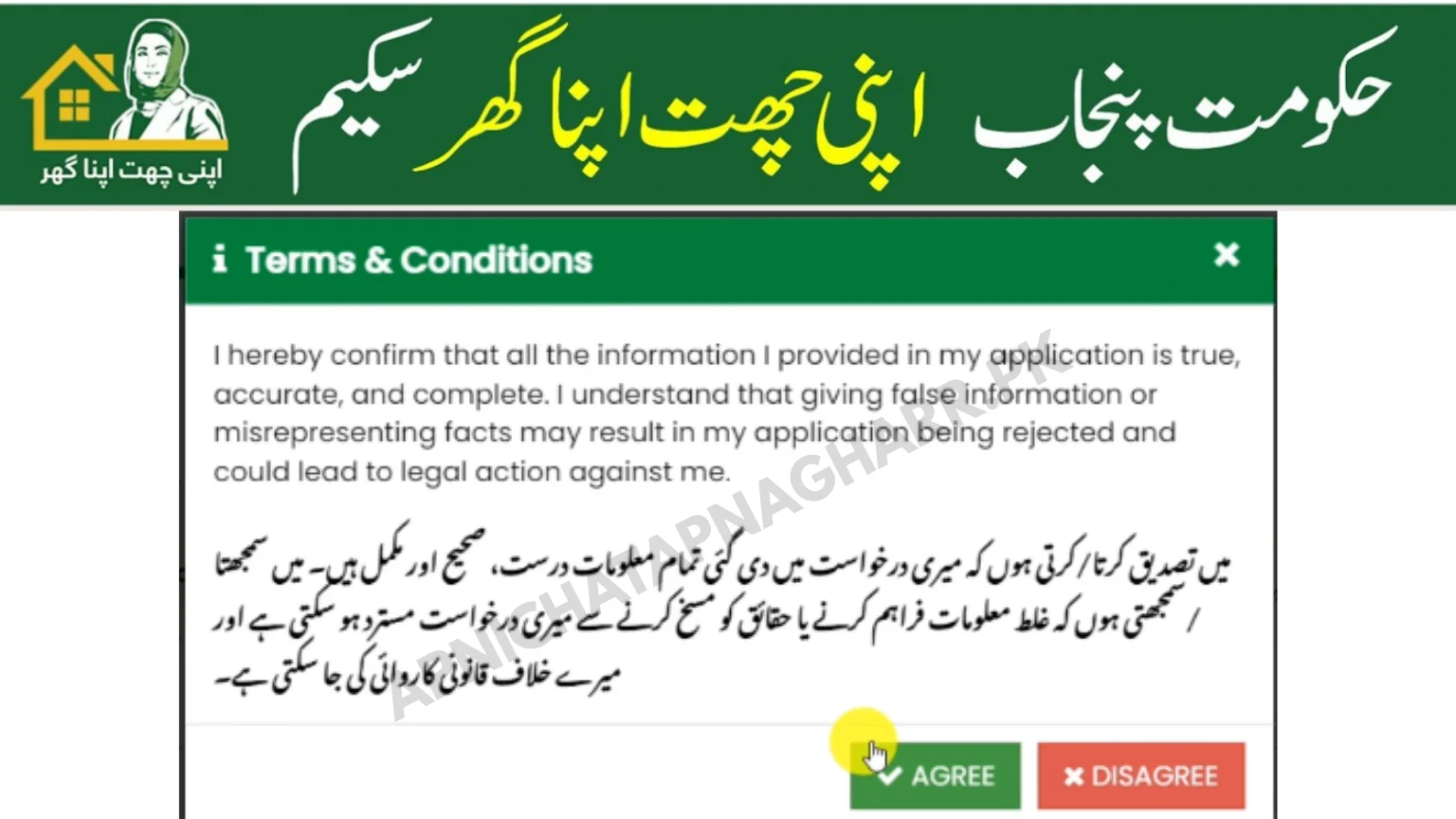
Jaise e Ap register pe click kren gy apko login page pe redirect kar dia jaye ga – mean ap k samne login page ajaye ga ab apko apna Id Card No or Password jo k apne register k time lgya tha add kar k login karna hoga, jaise e ap login karen gy ap k samne aik Certificate ajaye ga, jis me apne unko ye sureity deni hay k,
- I am Permanent Resident of Punjab, Pakistan
- I do not own any other house.
- I own a plot of up to 5 Marla in an urban area or 10 Marla in a rural area.
Disclaimer: hereby confirm that all the information I provided in my application is true, accurate, and complete. I understand that giving false information or misrepresenting facts may result in my application being rejected and could lead to legal action against me.
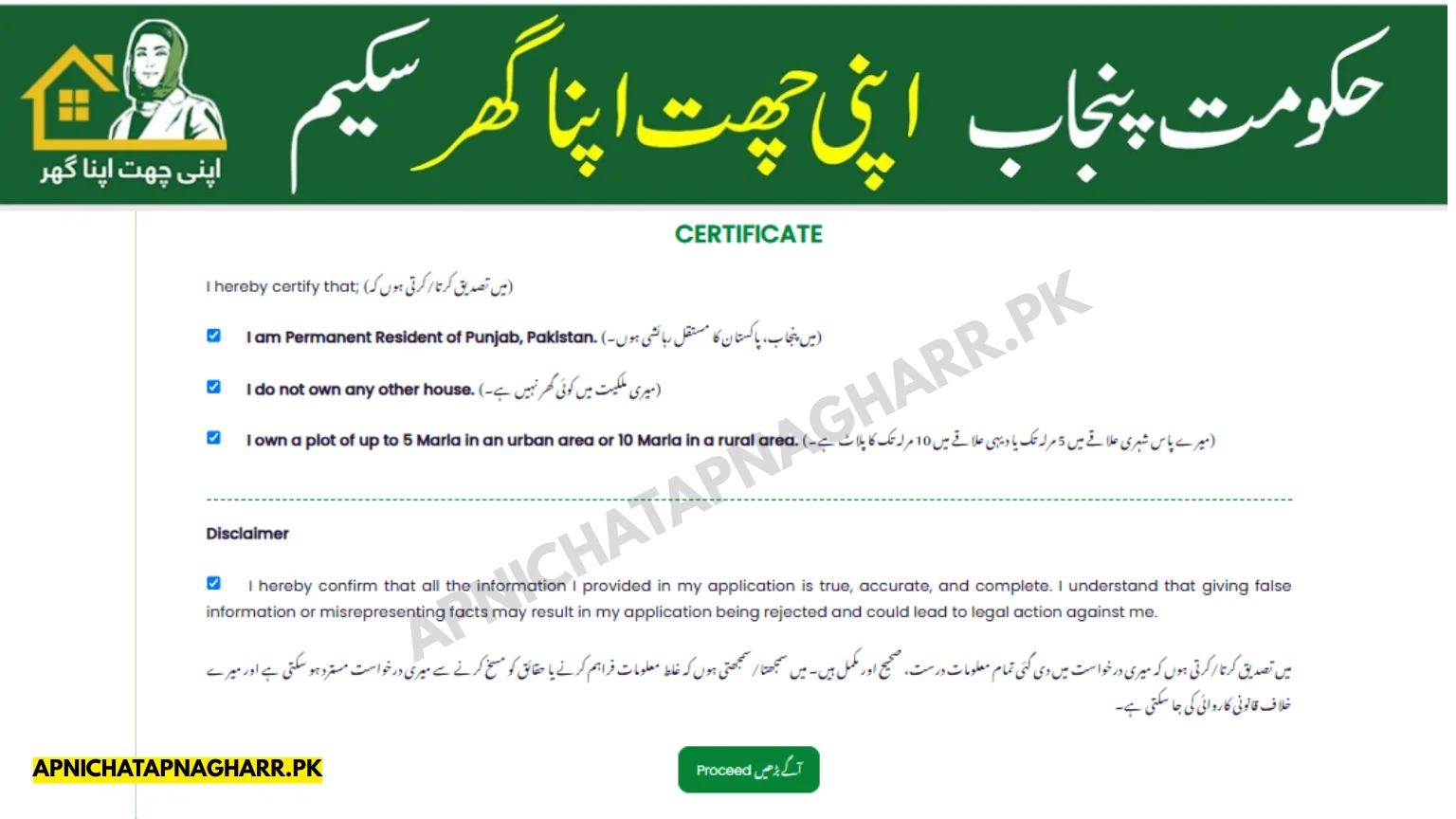
in sb pe click kar k check ka nishan ajaye ga or us k bad proceed k button pe click karna hay.
Step 4 – Fill Required Information
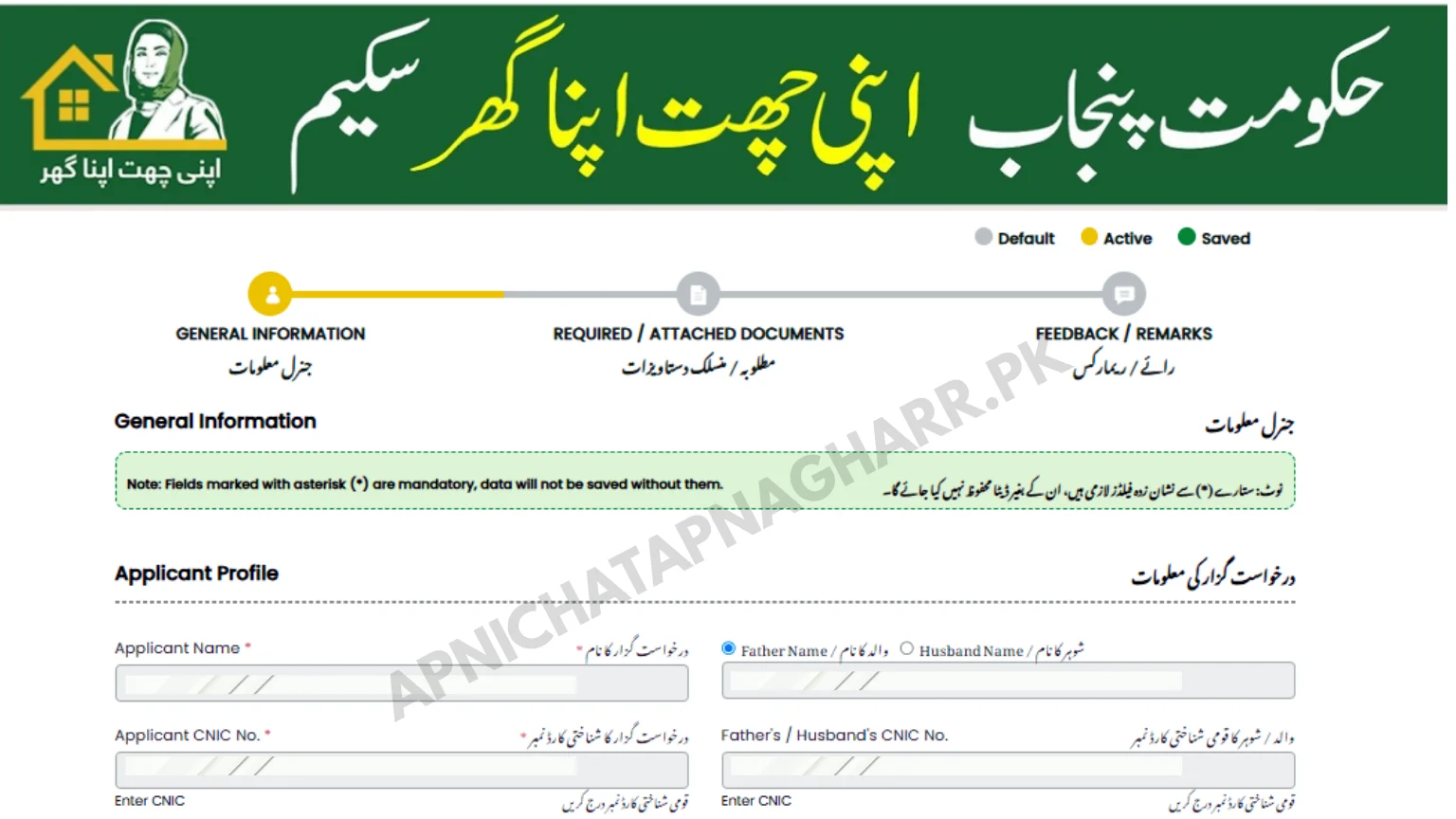
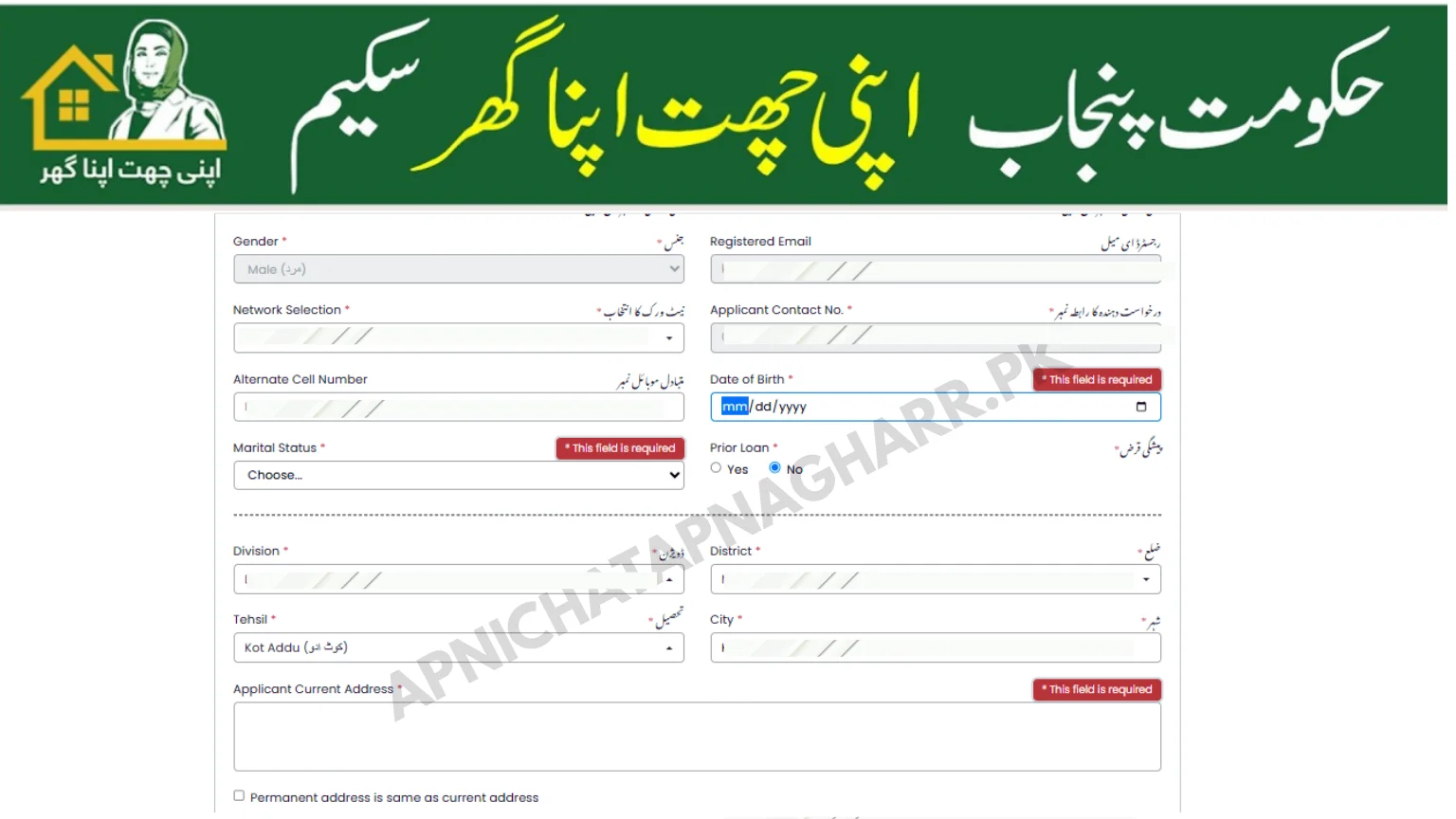
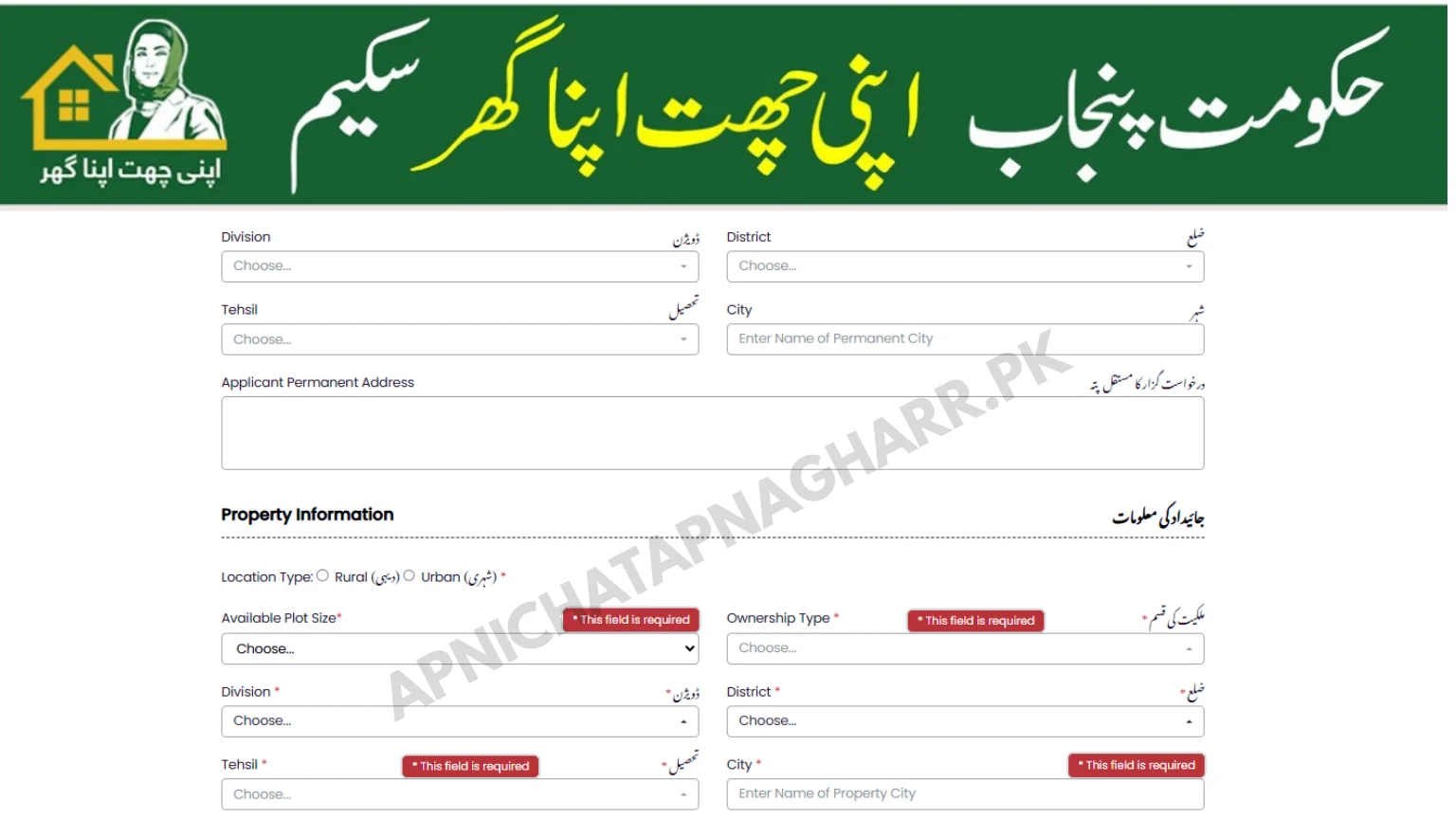
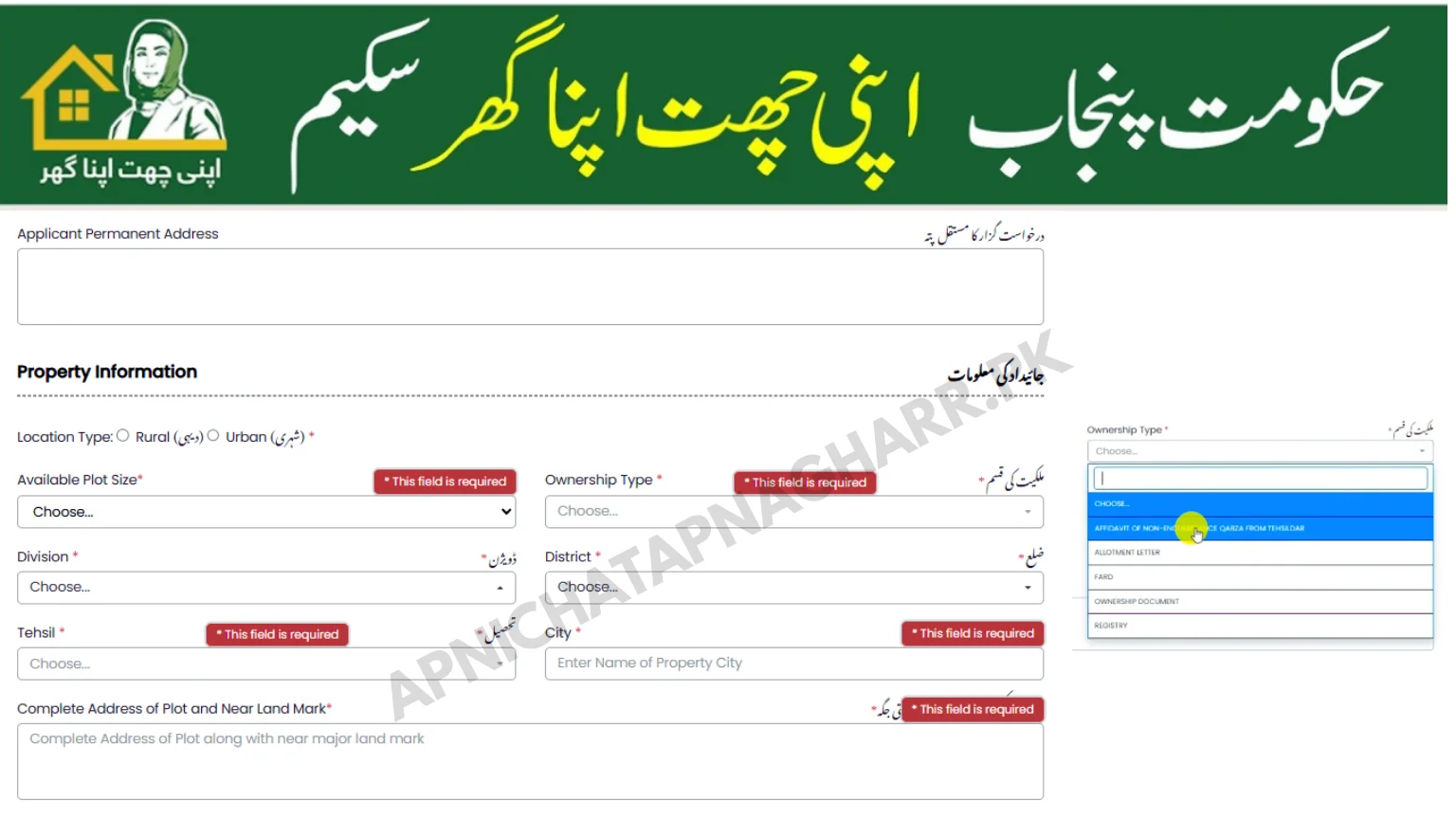
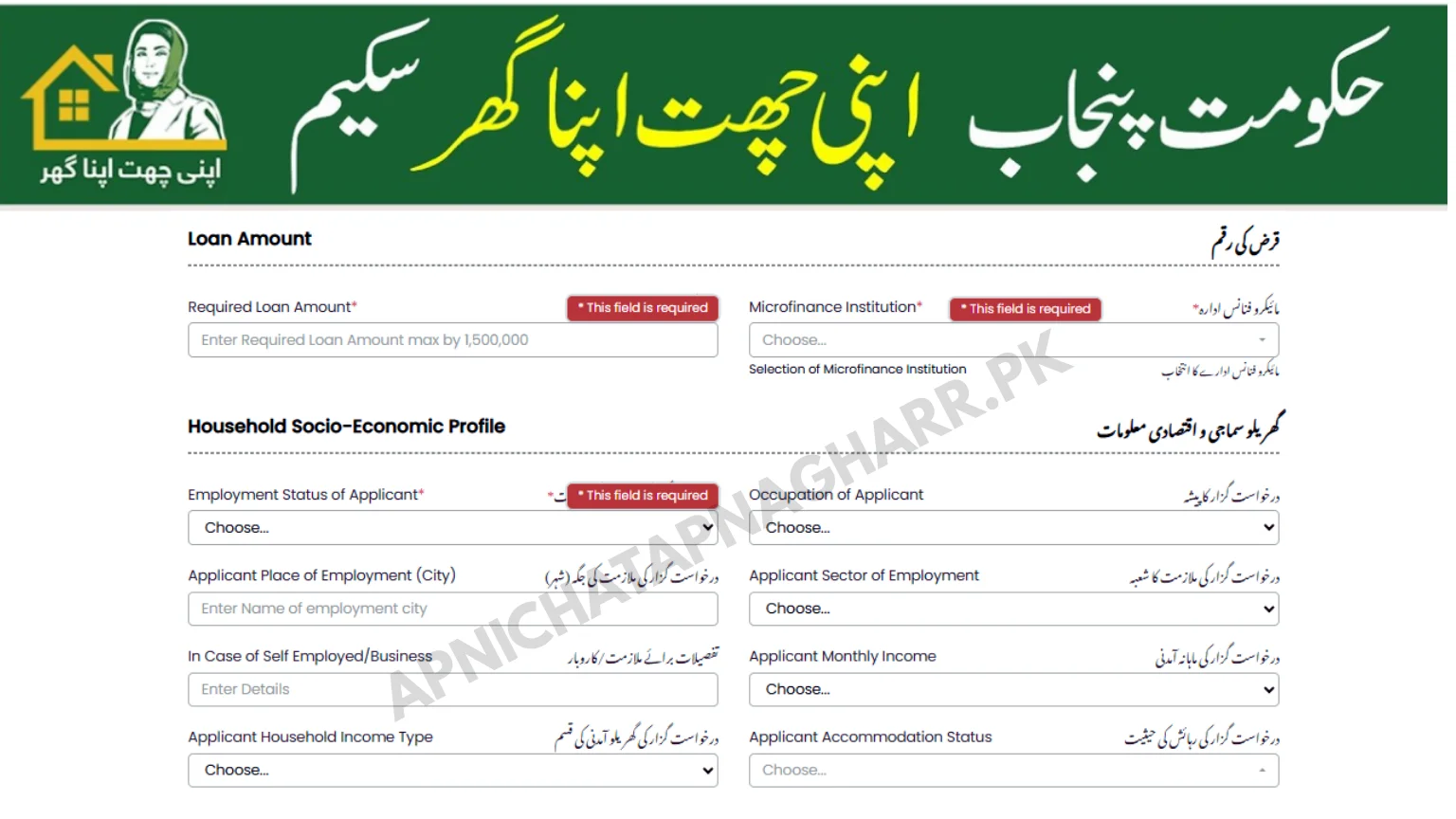
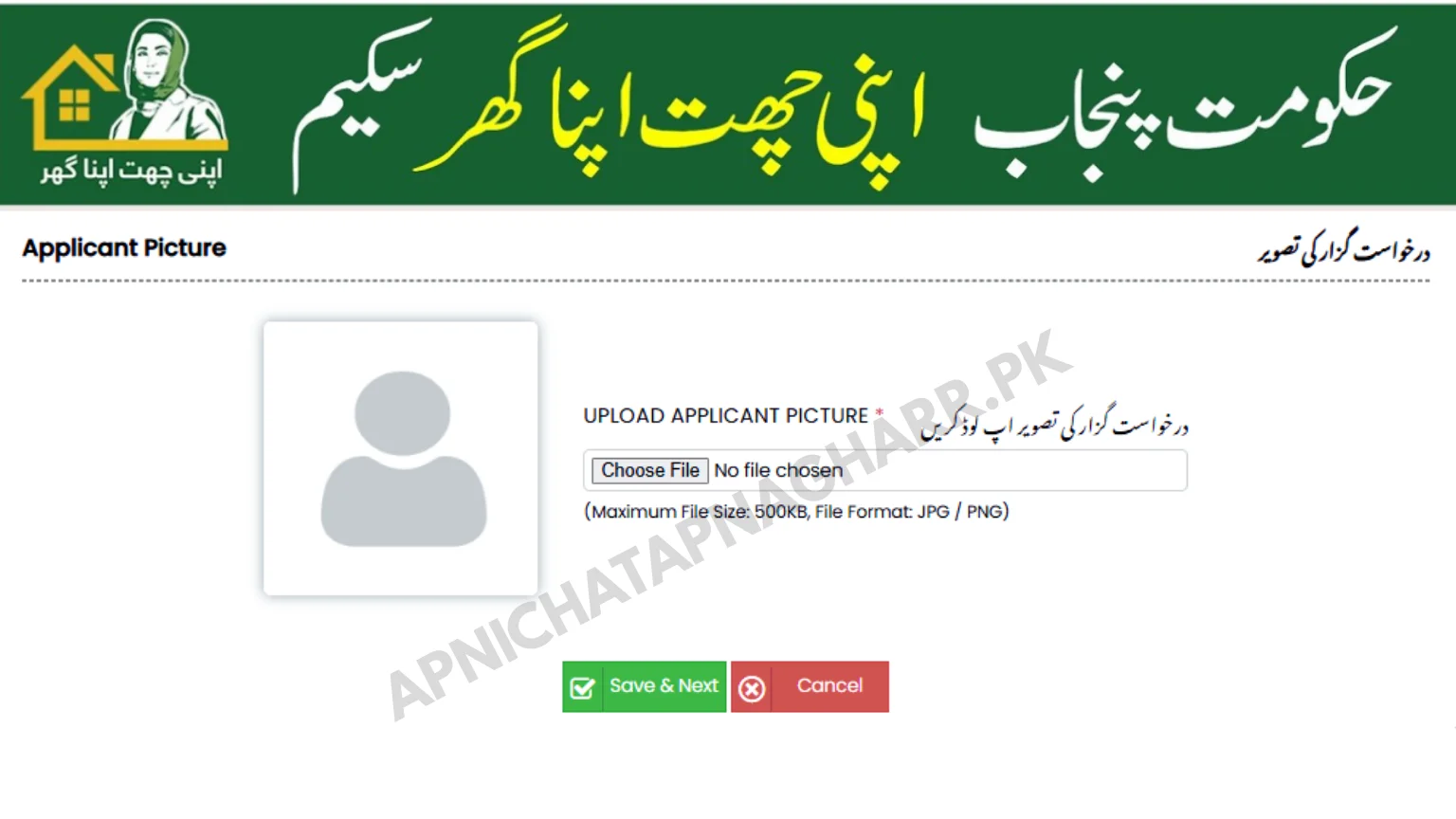
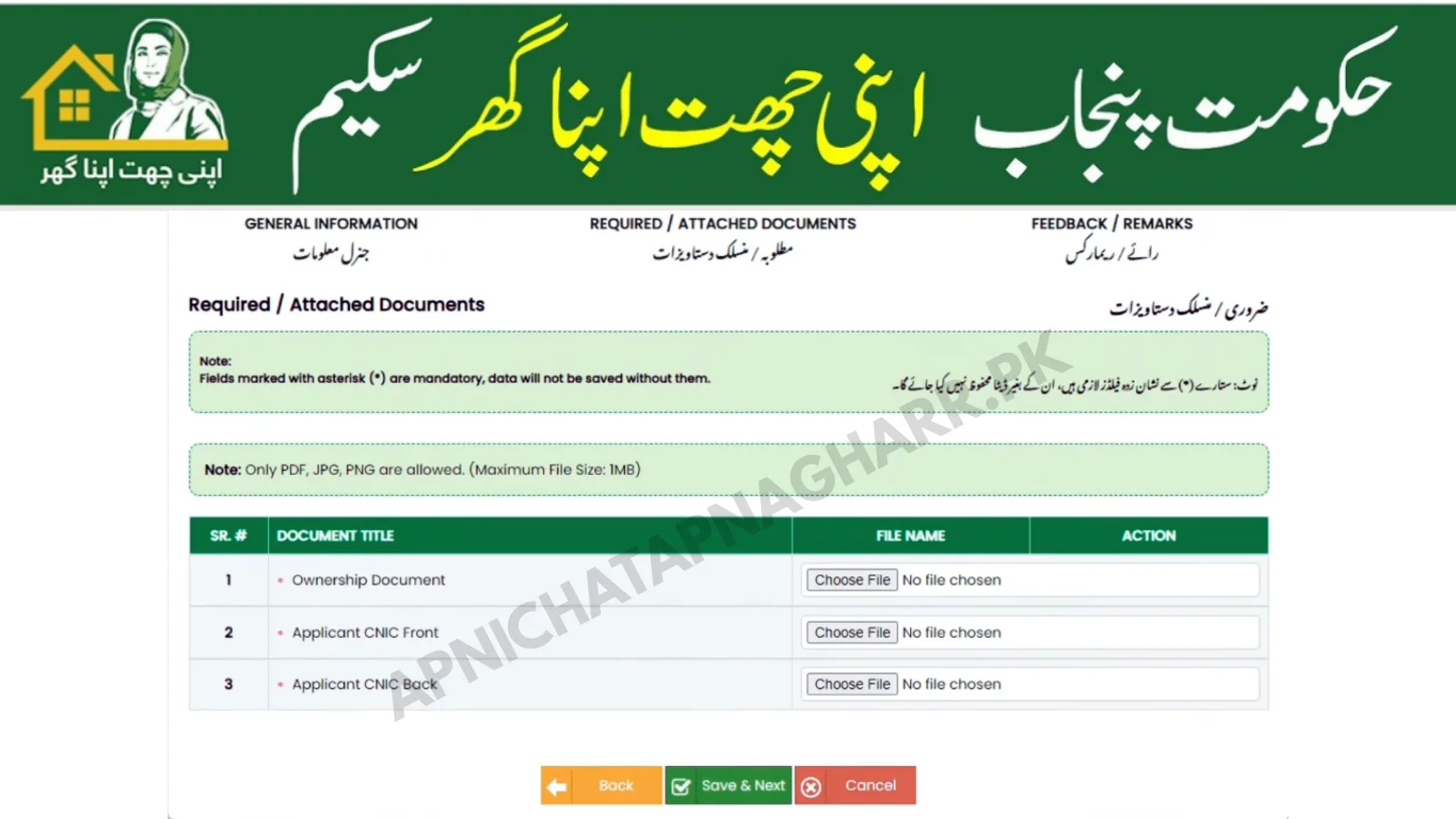
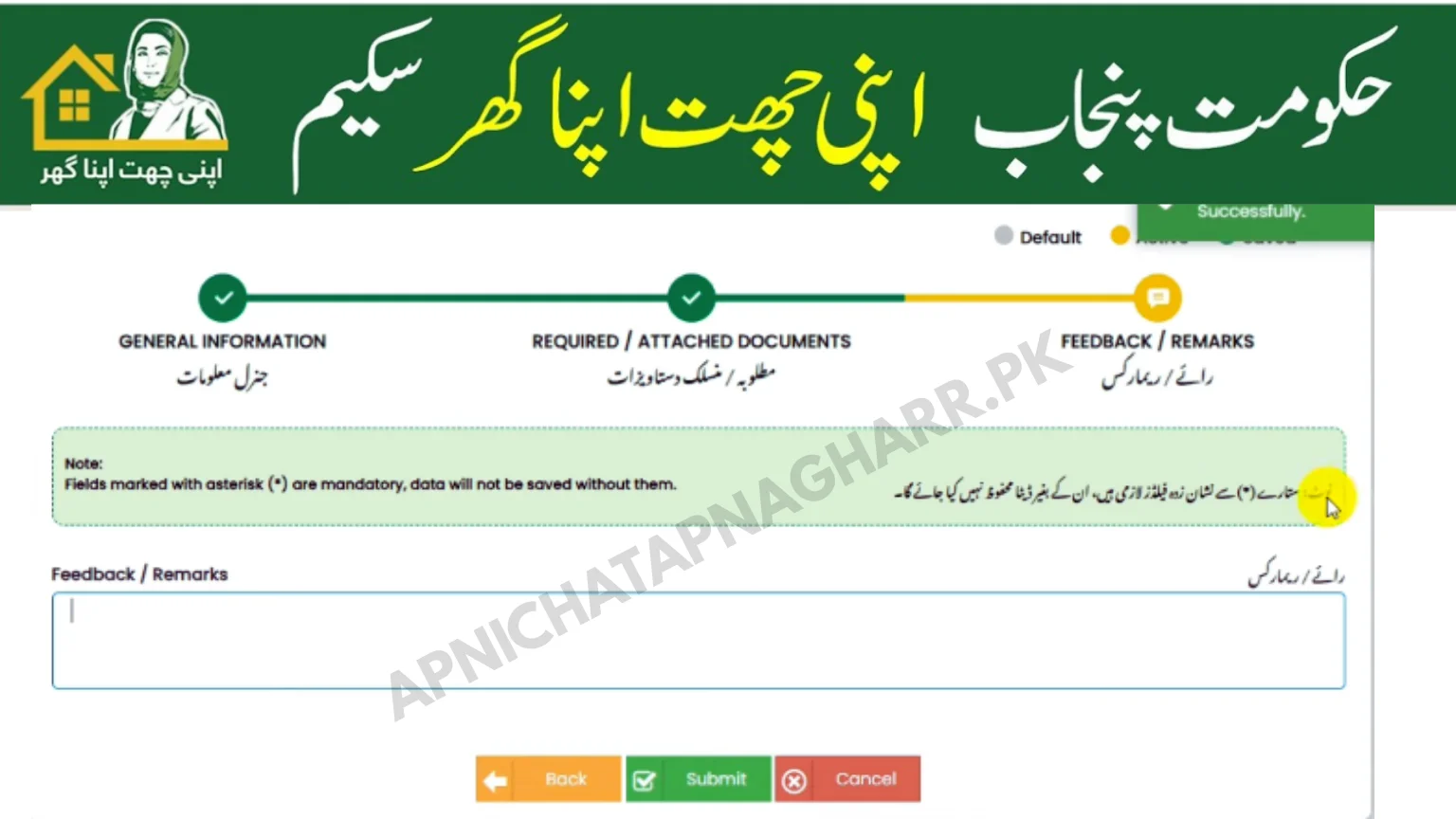
Proceed pe click karne k bad new forum open hoga jahan pe 3 differnet pages hogy jinko 1 by 1 fill karna hoga
- General Information
- Required Documents
- Feedback/Remarks
General Information
Required Documents
Feedback/Remarks
How to Login to Apni Chat Apna Ghar Portal
Agar aapne register kar liya hai to ab Apni Chat Apna Ghar login karna seekhein:
- acag.punjab.gov.pk par jayein
- “Login” button click karein
- CNIC (bina dash ke) aur password daalein (jo registration par mila tha)
- “Login” press karein
Agar password bhool gaye hain to “Forgot Password” option use karein. Aapke mobile par reset link ya OTP aayega.
Login karne ke baad aap apna dashboard dekh sakte hain jahan:
- Application status
- Documents
- Balloting updates
- Installment details
sab kuch available hoga.
How to Check Apni Chat Apna Ghar Application Status
Apply online for Apni Chat Apna Ghar karne ke baad sab log yeh janna chahte hain ke meri application ka kya status hai. Yeh check karne ke do tarike hain:
📌 Method 1: Login karke
- Portal login karein jaisa upar bataya
- Dashboard par “Application Status” option mein current status dekhein:
- Under Review – Verification ho rahi hai
- Verified – Documents sahi hain
- Eligible – Aap balloting ke liye qualify hain
- Not Eligible – Koi requirement poori nahi hui
- Selected – Balloting mein naam aa gaya
Yahan se bhi aap Apni Chat Apna Ghar application status check kar sakte hain.
Offline Application Method – If You Cannot Apply Online
Agar aapko online apply karne mein difficulty ho rahi hai ya internet access nahi hai to offline apply bhi kar sakte hain:
📍 Nearest Registration Center ya Deputy Commissioner Office mein jayein
📍 Wahan par application form milega
📍 Form bharein aur documents attach karein
📍 Staff aapki registration kar dega
📍 Aapko ek acknowledgment slip milegi
Iske alawa aap toll-free helpline par call karke bhi assistance le sakte hain.
Common Mistakes to Avoid While Applying
How to apply for Apni Chat Apna Ghar mein yeh common mistakes avoid karein:
❌ Wrong CNIC entry – CNIC number sahi se check karein
❌ Incomplete documents – Required documents pooray na hon
❌ False information – Jhoothi information dene par application reject
❌ Deadline miss – Last date ke baad apply nahi kar sakte
❌ PMT score check na karna – 60 se upar score ho to apply na karein
❌ Agent ke chakkar mein aana – Koi fee nahi hai, free apply karein
In mistakes se bach kar aap successful application kar sakte hain.
Apni Chat Apna Ghar Helpline & Support
Agar how to apply for Apni Chat Apna Ghar ke kisi bhi step mein problem ho to official helpline par contact karein:
📞 Toll-free: 0800-09100
📞 Alternate: 042-99213419, 042-99213428
📧 Email: info@phata.punjab.gov.pk
🌐 Portal: acag.punjab.gov.pk
Yahan par trained staff aapki guidance karega.
Frequently Asked Questions
How to apply for Apni Chat Apna Ghar online?
Official portal acag.punjab.gov.pk par jayein, registration form bharein, documents upload karein aur submit kar dein. How to apply for Apni Chat Apna Ghar ka yahi sab se simple tareeka hai.
What documents are needed to apply for Apni Chat Apna Ghar?
CNIC, land ownership documents, PMT score certificate aur passport size photo. Complete list ke liye Required Documents page dekhein.
Is there any fee for Apni Chat Apna Ghar registration?
Nahi, registration completely free hai. Koi bhi fee nahi hai
How to check Apni Chat Apna Ghar application status?
Portal par login karke ya bina login ke CNIC se status check kar sakte hain.
What is PMT score and why is it required?
PMT score Poverty Measurement Tool hai jo family ki socio-economic condition batata hai. 60 ya us se kam score required hai.
Can I apply offline for Apni Chat Apna Ghar?
Haan, Deputy Commissioner Office ya registration centers mein ja kar offline apply kar sakte hain.
How to login to Apni Chat Apna Ghar portal?
acag.punjab.gov.pk par CNIC aur password se login karein.
What is the last date to apply for Apni Chat Apna Ghar 2026?
Last date government ki taraf se announce ki jati hai. Regular updates ke liye Blog check karte rahein.
How will I know if I am selected in balloting?
Selected applicants ko SMS aur portal dashboard par notification milti hai. Aap Balloting Results page par bhi check kar sakte hain.
Is this website the official government portal?
Nahi, yeh independent informational website hai. Official portal acag.punjab.gov.pk hai.
Conclusion
How to apply for Apni Chat Apna Ghar ab aapko fully guide mil gayi hai. Yeh Punjab government ka behtareen scheme hai jo low-income families ko apna ghar provide kar rahi hai. Agar aap eligible hain to for sure apply karein.
Yad rakhein:
✅ Online apply karein official portal se
✅ Documents complete rakhein
✅ Deadline miss na karein
✅ Agent ke chakkar mein na aayein
Apply online for Apni Chat Apna Ghar aur apne ghar ka sapna sakaar karein. Agar koi question ho to Contact Us karein ya FAQs check karein.
🔗 Important Links
| Page | Link |
|---|---|
| 🏠 Homepage | Visit Home |
| 📄 About Us | About Apni Chat Apna Ghar |
| 👥 Our Team | Meet Our Team |
| 📞 Contact Us | Get in Touch |
| 📝 Blog | Latest Updates |
| 📑 Required Documents | Documents List |
| 🏆 Balloting Results | Check Results |
| ❓ FAQs | Frequently Asked Questions |
| 🗺️ District Quota | District Wise Details |
| 📜 Terms & Conditions | Terms of Use |
| 🔒 Privacy Policy | Privacy Policy |
| ⚠️ Disclaimer | Disclaimer |
| 🗺️ HTML Sitemap | All Pages |
📱 Connect With Us
| Platform | Link |
|---|---|
| WhatsApp Channel | Join WhatsApp |
| Follow on Facebook | |
| Follow on Instagram | |
| Threads | Join Threads |
| Twitter (X) | Follow on Twitter |
| Connect on LinkedIn | |
| Follow on Pinterest | |
| TikTok | Follow on TikTok |
| YouTube | Subscribe on YouTube |
| Behance | View on Behance |
| Dribbble | Follow on Dribbble |
| Medium | Read on Medium |


 Join Channel
2 Comments